


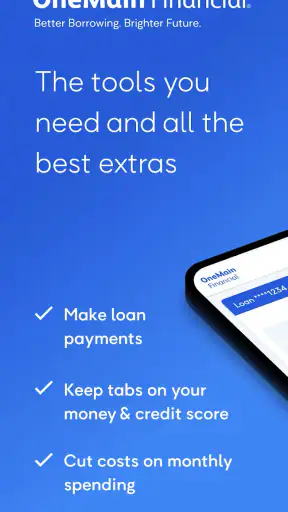
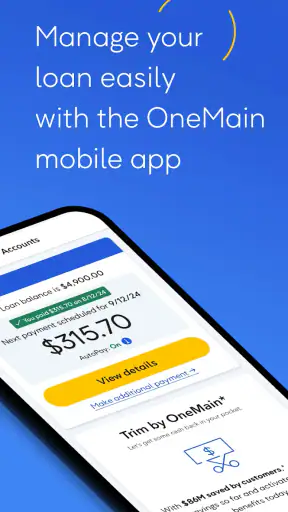
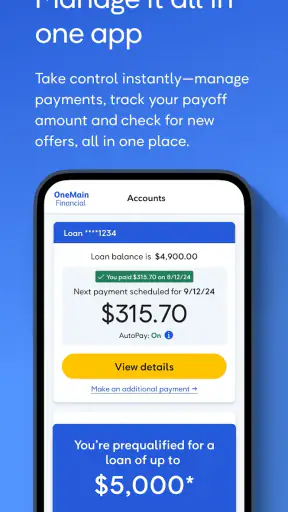
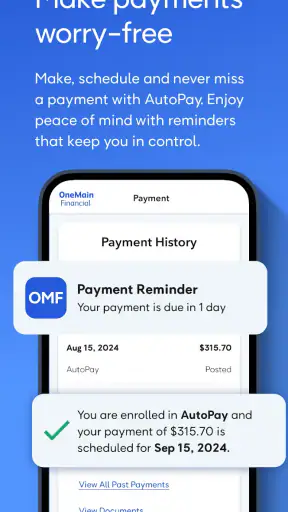
When I look at a finance app, I do not begin with its rating or download count. I first ask whether it makes one important money task easier without creating another problem. With OneMain Financial, that task is managing a loan from a phone: checking the account, making payments, and keeping an eye on credit-related information in one place. That focused purpose makes it easier to judge than a broad budgeting app, but it also means the right choice depends heavily on what you need from a finance tool.
I reviewed it as a practical companion for an existing OneMain Financial customer rather than as a general-purpose money manager. The app is free, belongs to the finance category, and is developed by OneMain Financial. It has built a strong audience, with a 4.7 average from around 28 thousand ratings and more than a million installs. Those figures suggest that many borrowers find the core experience useful, although popularity alone does not tell me whether it will suit someone who wants detailed budgeting, investment tools, or banking services.
How I would decide whether OneMain Financial fits
The first decision point is simple: do you already have, or are you actively considering, a OneMain loan? If the answer is no, much of the app’s value disappears. This is not designed to replace a full bank app or serve as a universal dashboard for every account you own. Its strongest use is keeping loan-related tasks close at hand, especially when I want to check in without opening a browser or searching through old messages.
The second question is how often you need to interact with your loan. Someone who makes a payment occasionally and prefers paper statements may not gain much from installing another finance app. On the other hand, a borrower who wants a quick way to review the account before payday, confirm a payment, or monitor credit information has a clearer reason to use it. The app earns its place when it reduces small moments of uncertainty.
I would also consider how much financial information I want in one application. A dedicated loan app can feel less cluttered than a large banking platform, because the purpose is narrow. That focus is helpful when the immediate question is, “What do I owe, and what do I need to do next?” It is less helpful when the question becomes, “How are all my spending, savings, credit cards, and investments performing together?”
Another practical criterion is the operating system on an older phone. The listed minimum is Android 7.0, so the app is not restricted to only recent Android devices. That is useful for people who keep an older handset, though I would still keep the app updated when possible. The current version is 10.31.0, which shows that the application continues to receive version updates rather than being treated as a forgotten companion.
The everyday loan-management scenario
Imagine I am paid every other week and want to handle a loan payment before spending money elsewhere. Instead of waiting until I am at a computer, I can open the app, review the account, and make the payment from the same place. Afterward, I can return to the account to check that the activity appears as expected. That workflow is not dramatic, but it is exactly the kind of small routine that can prevent a missed task.
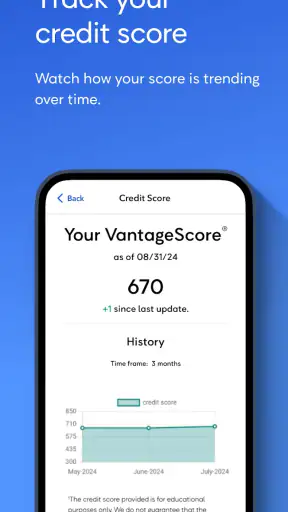
I find the credit-tracking side useful for a different reason. It gives the app a broader purpose than payment entry alone: I can use it as part of a regular review of my borrowing picture. I would not treat a credit view as a complete financial diagnosis, but it can prompt better questions. If something looks different from what I expected, I can investigate rather than ignoring my credit until I need to apply for something.
A good habit is to separate checking from reacting. I would open the app on a regular schedule, review the loan information calmly, and note any question before making changes. That is better than opening it only when a payment is overdue or when I am already worried. The app can make access easier, but it cannot replace a personal plan for due dates, available cash, and total borrowing costs.
What the focused design does well
The clearest strength is concentration. A general banking app may show balances, transfers, cards, deposits, alerts, and promotional material all at once. OneMain Financial is more directly connected to the loan relationship. For me, that reduces the number of screens I need to navigate when the only job is reviewing or paying the loan.
That focus also makes the app easier to explain to another person. If a family member asks how to handle a OneMain account from a phone, I can describe the purpose without sending them through a long list of unrelated tools. The app is not trying to be a complete personal-finance command center. Its usefulness comes from doing a smaller set of account tasks in a context where speed and clarity matter.
The combination of loan management and credit tracking is another sensible pairing. Borrowing decisions should not be separated entirely from credit awareness. Having both areas available encourages me to think beyond the next payment and consider how the account fits into my wider financial situation. That does not make the app a credit-repair service or a budgeting coach, but it gives the loan experience more context.
The free price is important for this type of tool. I would not want to pay a separate subscription merely to access an account I already hold. Free access lowers the barrier to trying it, and it makes sense for borrowers who want a convenient mobile channel without adding another recurring expense. The age rating is Everyone, which is consistent with a broadly accessible financial utility, although adults remain responsible for deciding whether the account information is appropriate to share on a particular device.
Small habits that make the app more useful
My first tip is to use it before, not after, the payment deadline. Opening the app early gives me time to notice an incorrect amount, an unexpected account detail, or a problem with the payment method before the last minute. A mobile tool is most valuable when it creates breathing room, not when it becomes a place where I rush through an urgent task.
My second tip is to treat payment confirmation as a separate step from payment submission. After making a payment, I would look for the resulting account activity and keep my own record until everything is settled. This is a simple safeguard for any financial app. A button press is not the same thing as a completed financial outcome, and relying on memory can make later troubleshooting harder.
My third tip is to use the credit area as a recurring checkpoint rather than a source of daily anxiety. Checking too often can encourage overreaction to normal changes, while never checking leaves me uninformed. A planned review, followed by a note of anything that needs attention, gives the feature a practical role in a broader money routine.
I would also avoid assuming that a loan app replaces a calendar. Even if the application makes payments convenient, I would still keep a personal reminder for the due date and maintain enough money in the chosen payment account. Redundancy is worthwhile here. The app reduces friction, but a second reminder protects me if I change phones, lose access temporarily, or simply forget to open it.
Where other finance options may fit better
The main trade-off is specialization. If I want a single place to see several bank accounts, credit cards, spending categories, and savings goals, a broader personal-finance app may be a better fit. OneMain Financial is more appropriate when the loan itself is the center of attention. Comparing the two categories is not about declaring one universally better; it is about choosing between depth around one relationship and breadth across many accounts.
A bank’s own mobile app may be preferable when most of my financial life is already held at that bank and I want transfers, deposits, card controls, and loan information together. A dedicated lender app can still be easier for loan-specific activity, but switching between applications may be annoying if I regularly move money from a bank account to cover payments. In that situation, the bank app may remain the main tool, with OneMain Financial used for account-focused checks.
A budgeting app may be the better choice for someone trying to control spending or build a monthly plan. OneMain Financial can show useful loan and credit information, but that is not the same as categorizing every purchase or assigning money to future goals. I would not install it expecting a complete picture of household cash flow. It can contribute to that picture, but it is not the entire picture.
Someone comparing loans should also distinguish account management from loan shopping. This app makes the most sense after OneMain is already part of the decision. If I am still comparing lenders, rates, repayment terms, and total costs, I need to evaluate those financial details independently rather than choosing an app because its mobile experience looks convenient. A polished payment workflow cannot make an unsuitable loan suitable.
There is also a privacy and access trade-off with any financial application. Keeping loan information on a phone is convenient, but I would protect the device with a strong screen lock and avoid signing in on a shared handset. If I rarely use mobile finance tools, the convenience may not justify changing my habits. If I use my phone as my main financial device, the dedicated access becomes more compelling.
What may feel less convenient
The narrow purpose can become a limitation when my needs expand. I may still need a separate app to check my checking balance, another service to track everyday spending, and a calendar to organize due dates. That is not a flaw in the loan-management function, but it does mean the application may add one more stop to my routine instead of consolidating everything.
I also would not expect the app alone to answer every question about a loan. A mobile interface is excellent for routine actions, but complicated account concerns may require careful reading and direct support. If I am dealing with a payment dispute, a change in circumstances, or a question about terms, I would use the app to gather the relevant account context and then seek the appropriate help rather than trying to solve a complex issue through repeated taps.
Credit tracking deserves the same measured expectation. Seeing credit-related information can be useful, but it should not encourage me to make borrowing decisions based on one glance. Credit health involves multiple factors, and the app is best treated as one source of awareness. I would use it to notice and investigate changes, not as a substitute for reading loan documents or understanding the consequences of a new application.
There is a switching cost if I move away from the app after building a routine around it. I may need to recreate reminders, learn a different lender or bank interface, and remember where to find loan activity. That effort is small for an occasional user, but it matters for someone who checks the account frequently. Before switching, I would make sure the alternative handles the specific tasks I use most, especially payment access and account review, rather than judging it only by its wider feature list.
Who should use it and who should skip it
I would recommend trying OneMain Financial to an existing OneMain borrower who prefers handling routine account tasks on a phone. It is especially suitable for someone who wants a direct way to review a loan, make payments, and include credit awareness in the same routine. The free price makes experimentation easy, and the broad device support is helpful for people who are not using the newest Android hardware.
I would be more cautious about recommending it to someone who wants a complete household finance system. If the priority is expense categorization, shared budgeting, investment monitoring, or managing accounts from several institutions, a broader alternative will probably be more efficient. The same applies to someone who does not have a OneMain relationship: the app’s focused design is unlikely to justify space on the phone without that connection.
I would also skip it as a standalone reason to take out a loan. The convenience of mobile management should come after comparing the borrowing decision itself. Before committing, I would consider the repayment obligation, whether the payment fits my budget, and how the loan affects my wider financial plan. The app can support responsible management, but it cannot make an unaffordable commitment safe.
My recommendation after weighing the trade-offs
My overall view is positive, with a clear boundary. OneMain Financial is a useful specialized finance app, not a universal replacement for banking and budgeting tools. Its best quality is that it puts loan-related actions and credit awareness in a focused mobile setting. For the right user, that can turn an inconvenient account chore into a quick, repeatable routine.
I would install it if I had a OneMain loan and wanted dependable mobile access to the account. I would use it alongside a calendar and, if needed, a separate bank or budgeting app. That combination respects what the application does well without asking it to solve problems outside its purpose. I would also keep my expectations realistic around complex questions and use direct assistance when an issue goes beyond routine management.
The app is free, rated for Everyone, and comes from a developer with a long-running presence in this category; it was released on April 10, 2014. Those details provide useful context, but my recommendation rests more on fit than on age or popularity. If your financial life centers on a OneMain loan, the focused access is worth trying. If you want a complete view of every dollar you earn and spend, choose a broader finance tool instead and treat this one as a specialist companion.
In short, I see OneMain Financial as a practical choice for borrowers who value direct access over a crowded feature set. Its strongest benefit is convenience with a purpose: checking the loan, handling payments, and staying more aware of credit without turning the experience into a full financial control panel. That focused role is also its main limitation, so I would recommend it confidently to the right OneMain customer, but not automatically to everyone looking for a finance app.


